Give Shendeng VPN for China a Try for Free!

  • A single Shendeng VPN for China account for all devices.
  • Various Shendeng VPN for China plans available: from 1-week to 1-year.
  • Prompt Shendeng VPN for China customer support.
  • Free time daily!
  • 30-day money-back guarantee.
By checking in daily on the app, you can earn a free tier.
Free trial of Shendeng VPN for China

Why can I only access the web versions of Telegram, WhatsApp, Line, Hotmail, and Gmail, but not the apps?

The split mode feature in Shendeng VPN for China supports web applications like Telegram, WhatsApp, or Gmail, which utilize HTTPS. This mode can alter the routing for both HTTP (port 80) and HTTPS (port 443), facilitating access to the web versions of these applications. However, the application versions may use various other ports.
To ensure access, the following measures should be implemented:
  • Use the "Global Mode" option available in the routing settings.
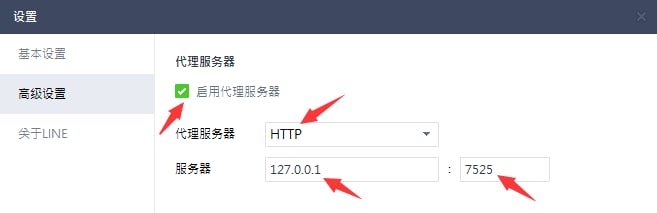
  • Modify the proxy settings of the application. For example, here is how you can change the proxy settings for the LINE app:

    Line app zh-hans settings

Why is my connection speed slow when I connect to the VPN?

Common causes of network issues include:
  • Slow internet speeds locally (without using a VPN).
  • High user traffic at certain VPN server locations.

To resolve these issues, you can try the following methods:

  • Check your local internet speed by temporarily disabling the VPN.
  • Test different network connections such as WiFi, 4G, or 5G with the VPN off to identify any connection problems. For example, if your WiFi is unreliable, switch to a mobile data connection.
  • Turn off the VPN, switch to a new server location, and then reconnect.
  • If you want to stay connected to the same geographical area, disconnect and reconnect as this could link you to a different server within the same region.
  • Continue these tests until you find the most suitable server for your requirements.

Payment successful, but the plan is not activated.

Occasionally, there may be a delay in processing payments through the gateway. Here are the essential points to remember:

  • We accept various payment methods, including Alipay, WeChat QR Code Scanning Payment, and UnionPay.
  • If you have successfully made a payment but don't immediately see the corresponding plan reflected in your account, wait for about 5 minutes, then log out and log back in.
  • If you're still experiencing issues after trying the above steps, take a screenshot of your payment confirmation and contact us for further assistance.

The Windows app is unable to connect to the VPN or access Google or YouTube.

这类问题通常是由于系统代理地址未正确设置或第三方软件屏蔽和阻止所引起的。为解决此问题,可以手动添加黑豹加速器(Shendeng VPN for China)的科学上网代理地址。
请按照以下步骤进行操作:

  • 在 Windows 系统中搜索并打开“Internet 选项”。
  • 导航到“连接”标签页。
  • 点击底部右侧的“局域网设置”按钮。
  • 在局域网(LAN)设置页面,勾选“使用自动配置脚本”选项,并在下方的地址框中输入:http://127.0.0.1:7525/proxy
  • 点击右侧底部的“确定”按钮,然后再次点击“确定”关闭 Internet 属性。
  • 最后,请完全关闭浏览器,然后重新打开浏览器即可享受科学上网。
如下图所示:
internetxx